- All
- Product Name
- Product Keyword
- Product Model
- Product Summary
- Product Description
- Multi Field Search
Views: 1 Author: Site Editor Publish Time: 2026-09-29 Origin: Site


High-security requirements in premium hospitality environments often clash with the expectation of a frictionless guest arrival. Implementing screening infrastructure without proper spatial planning leads to lobby bottlenecks, compromised aesthetic standards, and operator fatigue. These friction points directly degrade threat detection efficacy. A poorly planned checkpoint creates frustration before a guest even reaches the front desk.
To successfully integrate security hardware, security directors and facility managers must evaluate equipment beyond technical specifications. You must analyze how the physical footprint interacts with architectural constraints, operator ergonomics, and peak-hour guest flow. Designing an optimal hotel baggage scanner setup requires a strategic approach that balances rigorous threat mitigation with the seamless luxury experience your brand promises. We will outline the exact spatial, operational, and structural considerations necessary to build a highly effective lobby screening checkpoint.
A successful hotel baggage scanner setup requires balancing high-throughput conveyor configurations with the physical limitations of existing lobby architecture.
Operator workspace design directly impacts security outcomes; poor monitor placement and lack of ergonomic seating increase cognitive load and reduce image analysis accuracy.
Guest flow friction can be mitigated by matching scanner tunnel sizes to expected baggage profiles and utilizing automated roller tables for divestment and retrieval.
Procurement evaluations must account for hidden implementation costs, including floor load reinforcement, dedicated power circuits, environmental protections, and aesthetic concealment structures.
Table of Contents
A successful hotel luggage scanner deployment begins with clear performance targets. Define required bag throughput based on peak arrivals, group check-ins, and event surges to avoid creating queues or installing unnecessary oversized equipment. Calculate peak bags-per-minute requirements and include additional capacity for delays, secondary checks, and traffic fluctuations.
Security should enhance guest confidence without disrupting hospitality. Set acceptable waiting times and optimize the bag handling process from drop-off to retrieval. A smooth screening workflow reduces friction and keeps the arrival experience fast and welcoming.
Lobby design must balance security equipment with architectural limitations. Evaluate available floor space, ceiling height, entry locations, structural elements, and emergency exits before installation. Proper planning ensures the scanner fits seamlessly while meeting safety and building requirements.
Selecting the correct tunnel size is the most consequential decision in your hardware evaluation. The tunnel dimensions dictate what type of luggage can pass through the machine without requiring secondary manual inspection. You must analyze the standard luggage profile of your typical guest to make an informed choice.
Properties catering to short-term business travelers primarily see carry-on luggage and briefcases. In these environments, a compact scanner with a 60x40cm tunnel often suffices. Destination resorts and extended-stay properties routinely handle oversized hard-shell suitcases, golf clubs, and large garment bags. These locations require machines with tunnel dimensions ranging from 80x65cm to 100x100cm. You must weigh the trade-offs between larger tunnel capacities and the resulting loss of usable lobby floor space. A massive scanner accommodates everything but dominates the room visually and physically.
Tunnel Size (Approx.) | Ideal Property Type | Typical Baggage Profile | Lobby Footprint Impact |
|---|---|---|---|
60cm x 40cm | Boutique / Business Transit | Backpacks, briefcases, standard carry-ons | Minimal; easily concealed within standard millwork |
80cm x 65cm | Luxury / Standard Resort | Medium to large checked suitcases, garment bags | Moderate; requires a dedicated screening zone |
100cm x 100cm | Convention / Extended Stay | Oversized luggage, sports equipment, trade show gear | Significant; alters lobby flow and requires heavy reinforcement |
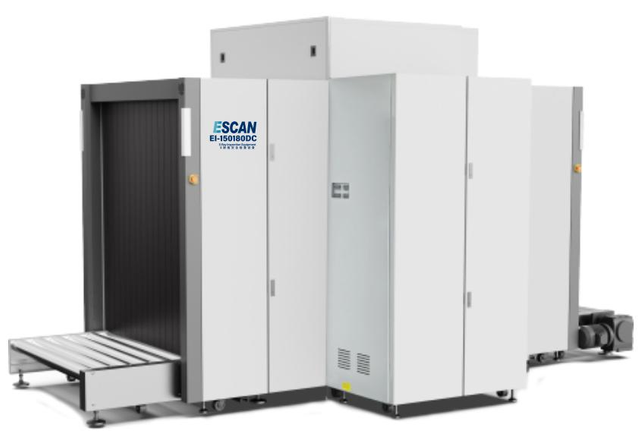
The scanner itself is only part of the required space. Proper entry and exit roller tables are essential to maintain smooth guest flow. The infeed area allows multiple bags to queue before scanning, while the outfeed area gives guests time to collect belongings without blocking the next person. Although the scanner may be only two meters long, the complete checkpoint layout often requires four to five meters of linear space.
X-ray screening equipment is extremely heavy because of its internal shielding materials. Before installation, verify that the floor can support concentrated loads, especially in premium lobbies or elevated floors. A structural review may require reinforcement measures such as steel load-distribution plates. Planning must also include delivery routes, elevator capacity, doorway clearance, and underground utilities to ensure safe installation.
The effectiveness of any security checkpoint relies heavily on the human operating the machinery. There is a direct correlation between physical discomfort and decreased threat detection rates in security personnel. When an operator is distracted by back pain or eye strain, their cognitive load increases, and their ability to identify subtle anomalies on a cluttered screen plummets.
Proper space allocation for the operator is non-negotiable. You must provide adjustable, ergonomic seating that supports posture during long shifts. Climate control within the screening zone prevents fatigue caused by overheating, especially near entry doors where temperatures fluctuate. Ambient lighting management requires careful planning; direct sunlight or harsh overhead fixtures create screen glare, making it nearly impossible to distinguish between organic and inorganic materials on the monitor.
You must ensure the operator has a clear, unobstructed line of sight to both the monitor and the physical guest divestment area. The operator needs to match the bag on the screen with the person who placed it on the belt. If the workspace forces the operator to turn their back to the guests, you create a severe vulnerability in your security protocol.
The configuration of the imaging displays dictates how quickly an operator can process a bag. Evaluating single versus dual-monitor setups depends on the complexity of the imaging software and the volume of traffic. Dual monitors allow operators to keep the main x-ray image on one screen while utilizing the second screen for zooming, image manipulation, or reviewing historical scans without losing their place.
Setup Type | Operational Advantages | Space Requirements |
|---|---|---|
Single Monitor | Lower cost, simpler interface for basic screening, requires less desk space. | Minimal; fits on standard control consoles. |
Dual Monitor | Allows simultaneous viewing of raw and manipulated images, faster threat resolution. | Requires extended console width and heavy-duty articulating arms. |
Optimal viewing angles and distance prevent eye strain. Monitors should be mounted on articulating arms, allowing operators of different heights to adjust the screens to eye level. The placement of the control panel must allow for rapid conveyor reversal or halting without excessive reaching. If a suspicious item is detected, the operator must be able to stop the belt instantly. A poorly positioned control panel delays this action.
A well-designed checkpoint should guide guests smoothly without creating a restrictive atmosphere. Queue barriers, signage, and floor markings should direct visitors toward screening while maintaining the hotel’s welcoming appearance. After screening, guests and luggage must move directly into the secure area to prevent backtracking or contact between screened and unscreened individuals.

Luxury hotels must integrate security equipment into the overall interior design. Custom enclosures, partitions, or recessed spaces can hide industrial-looking scanners while preserving security visibility. Noise and heat management are also essential, as conveyor motors and X-ray systems require sound insulation and proper ventilation to avoid disrupting the guest experience.
When selecting an x ray scanner for hotel applications, the choice between single-view and dual-view technology dictates your operational efficiency. Each system presents distinct advantages depending on your space constraints.
Single-View Systems: These machines offer a lower initial cost and a smaller physical footprint. They generate one image from a single generator. Because operators only see one angle, densely packed bags often require manual repositioning and a second pass through the machine to resolve overlapping items. This slows down throughput during peak hours.
Dual-View Systems: These systems require a higher upfront investment and occupy a larger footprint due to housing two independent x-ray generators. They significantly reduce secondary manual searches by providing simultaneous horizontal and vertical cross-sections of the luggage. This dual perspective allows operators to clear complex bags instantly, drastically improving guest flow and reducing queue times.
Hardware capabilities are only half the equation; the software driving the machine determines the actual security outcome. Evaluating built-in Threat Image Projection (TIP) software ensures your team remains sharp. TIP continuously tests and trains operators during live shifts by randomly projecting fictional threat items onto the scans of actual guest bags. If the operator flags the threat, the system congratulates them; if they miss it, the system logs the failure for remedial training. This keeps operators alert and prevents screen fatigue.
Advanced material discrimination capabilities speed up the decision-making process. Modern software uses color-coding to strip away organic or inorganic materials on the screen. If an operator is looking for a metal weapon, they can press a button to remove all clothing and organic matter from the image, leaving only the metallic shapes clearly defined. Organic materials typically render in orange, while inorganic metals render in blue, allowing for rapid visual sorting.
Network integration is becoming a standard requirement for large hospitality brands. Connecting the scanner to centralized security operations centers (SOC) allows for remote monitoring and diagnostics. If a machine experiences a fault, IT can often diagnose the issue remotely before dispatching a technician. Supervisors can monitor operator performance and view live scans from a secure back office.
Initiate a comprehensive site survey with a structural engineer to verify floor load capacities and map out dedicated electrical circuits.
Request 3D CAD models from your shortlisted vendors to visualize the exact footprint and roller table extensions within your specific lobby layout.
Coordinate with your interior design team to draft millwork concepts that will conceal the hardware without restricting operator access or blocking necessary ventilation.
Draft a standardized operator training manual that incorporates Threat Image Projection (TIP) protocols to ensure all new security hires are immediately proficient.
A: A standard footprint varies by tunnel size. A compact machine for carry-ons requires about 2 meters in length. A system designed for large luggage, equipped with necessary entry and exit roller tables, typically requires a linear footprint of 4 to 5 meters to ensure smooth guest divestment and retrieval.
A: Most commercial scanners operate on standard 110V or 220V AC power, drawing between 5 to 10 amps during operation. They require dedicated, isolated circuits to prevent interference. An Uninterruptible Power Supply (UPS) is highly recommended to protect the sensitive x-ray generator from voltage spikes.
A: Yes, scanners can be successfully integrated into custom millwork to match lobby aesthetics. Designers must ensure the enclosures provide active ventilation to prevent the equipment from overheating. Removable panels are also required so technicians can access the internal components for routine maintenance.
A: Single-view scanners use one generator to provide a single angle of the luggage, often requiring operators to manually reposition cluttered bags. Dual-view scanners use two generators to provide simultaneous horizontal and vertical images, allowing operators to see hidden items immediately and speeding up checkpoint throughput.
A: A standard machine with an experienced operator can process between 20 to 30 bags per minute. Throughput depends heavily on the use of entry and exit roller tables, the complexity of the bag contents, and whether the machine utilizes single-view or dual-view imaging technology.
A: Scanners are extremely heavy due to dense lead shielding, often weighing between 400 kg and 1,000 kg depending on the tunnel size. Facilities must consult a structural engineer to verify that the lobby floor can support this concentrated point load, sometimes requiring steel weight-distribution plates.