- All
- Product Name
- Product Keyword
- Product Model
- Product Summary
- Product Description
- Multi Field Search
Views: 105 Author: Site Editor Publish Time: 2026-07-22 Origin: Site


Security checkpoints operate under immense pressure where operators have mere seconds to decide if a bag passes or requires a manual search. This split-second decision relies entirely on the clarity and accuracy of the imaging data presented on the monitor. Poor material discrimination leads directly to high false-alarm rates, increased manual search times, operator fatigue, and the severe risk of missed threats due to ambiguous imaging. When operators cannot trust the screen, the entire security protocol slows down.
Understanding color-coding algorithms is not just essential operator knowledge. It serves as a primary technical evaluation metric for security directors and procurement teams selecting commercial X-Ray Scanner Machines. The ability of a machine to accurately translate material density and atomic composition into clear visual cues dictates the overall efficiency and security posture of any screening operation. You need equipment that removes the guesswork from the checkpoint.

Color Equals Atomic Number: Colors on X-Ray Scanner Machines do not represent the object's physical color; they represent the effective atomic number (Z-eff) of the material, categorized broadly into organic, inorganic, and mixed substances.
Standardized Threat Mapping: Orange typically indicates organic materials (including explosives and narcotics), blue denotes dense inorganic materials (metals, weapons), and green represents mixed or light metallic materials.
Density Dictates Brightness: While color indicates material type, the brightness or saturation of the color indicates material thickness and density.
Procurement Implication: Evaluating the dual-energy imaging software and automated threat recognition (ATR) capabilities is just as critical as the physical hardware when shortlisting X-Ray Scanner Machines.
Table of Contents
The baseline requirement for modern security screening is the ability to accurately differentiate between benign items and potential threats without requiring constant manual inspection. This capability hinges entirely on the machine's underlying imaging technology and its software algorithms. If the hardware cannot capture the data, the software cannot display the threat.
Modern X-Ray Scanner Machines utilize dual-energy X-ray technology. This process involves projecting both high and low energy beams through the target object. The system measures the attenuation, or absorption, of these two distinct energy levels as they pass through the material on the conveyor belt.
By analyzing the ratio of attenuation between the high and low energy beams, the machine's software calculates the effective atomic number (Z-eff) of the object. This calculation allows the system to classify the material type accurately. Legacy single-energy systems can only measure overall density. They fail to distinguish between materials of similar density but different atomic compositions. Dual-energy imaging is the modern standard for regulatory compliance and effective threat detection.
Feature | Single-Energy Scanners | Dual-Energy Scanners |
|---|---|---|
Beam Type | One energy level | High and low energy beams |
Detection Capability | Density only (grayscale) | Density and atomic number (color) |
Material Discrimination | Poor (cannot separate organics/inorganics) | Excellent (clear separation of materials) |
Regulatory Compliance | Obsolete for high-security checkpoints | Standard for aviation and critical infrastructure |
Standard imaging algorithms categorize materials based on specific Z-eff ranges. These ranges dictate how the software interprets the raw data from the detector arrays. The software translates these specific atomic number ranges into the visual color palette displayed on the operator's monitor.
This translation allows operators to quickly identify the general composition of items within a scanned bag or parcel. It streamlines the decision-making process. A block of cheese and a block of C4 might have similar shapes and densities, but their specific Z-eff signatures allow advanced software to highlight the anomaly.
The standard color outputs map directly to specific material categories and threat profiles. This mapping provides operators with immediate visual context. Knowing these colors is the first step in image analysis.
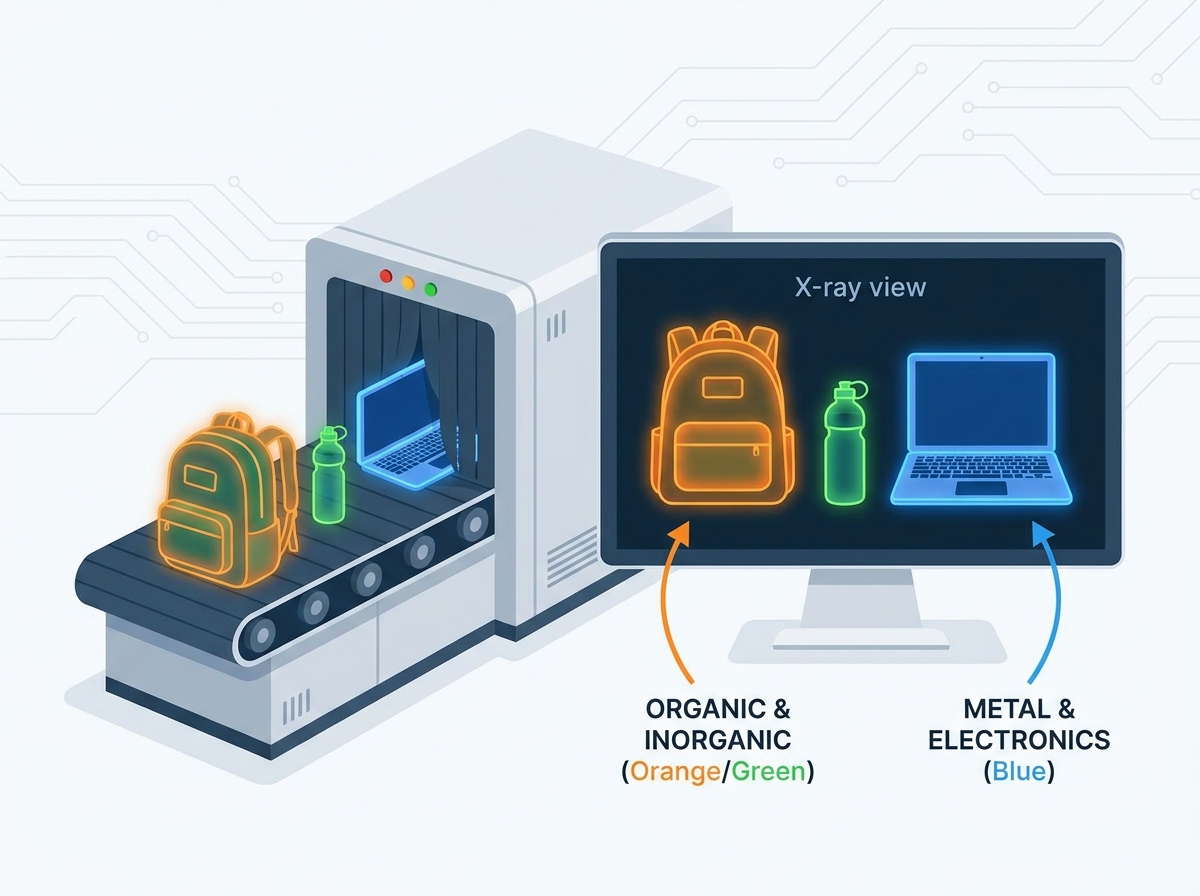
Standard 3-color imaging systems use orange, green, and blue to represent organics, mixed materials, and inorganics, respectively. Modern advanced systems often employ 4-color or 6-color palettes to provide better clarity.
The procurement value of multi-color systems lies in their finer Z-eff resolution. By providing more granular color distinctions, these systems reduce false alarms. They distinguish borderline materials more effectively. For instance, a 6-color system can visually separate benign food items from dense plastic explosives much better than a basic 3-color system.
Organic materials generally fall into an atomic range with a Z-eff of less than 10. These materials are primarily composed of carbon, hydrogen, oxygen, and nitrogen. The system displays these materials on a spectrum from red to orange.
Redder or lighter hues indicate very low-density materials like paper, wood, or thin liquids. Deeper orange indicates denser organic compounds. Common benign items in this category include clothing, food, paper, plastics, and wood. You will see a lot of orange when scanning standard passenger luggage.
Critical threat items also appear orange or red. These include C4, TNT, liquid explosives, narcotics, and agricultural contraband. When evaluating advanced X-Ray Scanner Machines, you must assess how effectively the software differentiates between benign organics and dense organic threats using specific highlighting features.
Heavy inorganic materials typically possess a Z-eff greater than 18. These are generally dense metals and heavy elements. The imaging software follows a simple rule: bluer means denser.
Light blue represents thin sheets of metal or lower-density inorganic compounds. Deep blue or violet indicates extremely high-density metals and heavy shielding. Common items include steel, copper, thick glass, and heavy tools. Critical threat items that render as blue include firearms, knives, pipe bomb casings, and ammunition.
Mixed or intermediate materials fall into an atomic range with a Z-eff typically between 10 and 18. This category bridges the gap between light organics and heavy inorganics. Common items that appear green include aluminum, silicon, electronic components, and various alloys.
Overlapping items can also render as green. An organic item packed tightly against an inorganic item may confuse the Z-eff calculation. This results in a green display that requires closer operator scrutiny. Laptops and complex electronics often show up as a dense block of green and blue.
When an object is too dense for the X-ray beam to penetrate, it appears black or opaque on the screen. This occurs with materials like lead shielding or thick steel blocks. The detectors receive no energy passing through that specific area.
Opaque items present a significant implementation risk. Security protocols must address opaque items rigorously. Smugglers frequently use them to shield other threats from detection. Operators must manually inspect any item that the X-ray beam cannot penetrate.

While color indicates material type, secondary visual cues provide essential depth and context. These cues allow operators to assess the physical characteristics of concealed items accurately.
The relationship between material thickness and image brightness is fundamental to image analysis. A thin sheet of steel will appear light blue. A thick block of steel will appear dark blue or black. The color remains constant based on the Z-eff, but the brightness changes based on attenuation.
Operators use fading and saturation to determine the volume and shape of concealed items. A gradual change in saturation helps operators visualize the contours and density gradients of an object. This provides a three-dimensional understanding from a two-dimensional image.
Material Category | Z-eff Range | Standard Color | Examples |
|---|---|---|---|
Organic | 0 - 10 | Orange / Red | Plastics, food, water, explosives, narcotics |
Mixed / Light Inorganic | 10 - 18 | Green | Aluminum, glass, electronic boards |
Heavy Inorganic | 18+ | Blue | Steel, iron, copper, firearms, blades |
Impenetrable | N/A (Too dense) | Black | Lead shields, thick steel blocks |
Operators frequently toggle between color and grayscale modes during inspection. Standard grayscale stripping removes color distractions to deliver superior edge detection, sharpness, and shape recognition.
This mode is highly effective for identifying fine-line threats that might be obscured by heavy color saturation. Detonator wires, thin blades, and complex micro-electronics hidden in luggage are often much easier to identify when viewing the raw density data in black and white.
Stop the conveyor belt when a suspicious mass is identified.
Toggle the display from full color to black and white mode.
Examine the edges of the object for hidden wires or razor blades.
Toggle back to color to confirm the material composition (organic vs inorganic).
Apply organic stripping if the object is hidden behind dense plastics.
Proprietary software enhancements differentiate tier-one machines from budget alternatives. The software translates raw data into actionable intelligence for the operator.
Standard software requirements for modern systems include Edge Enhancement, Pseudo-Color mapping, Inverse/Negative imaging, and Organic/Inorganic Stripping. Stripping features allow operators to temporarily remove organics from the screen to view underlying metals, or vice versa.
These features allow operators to digitally unpack dense baggage. By manipulating the image, operators can isolate specific materials and identify threats that are deliberately hidden within complex clutter. A knife hidden behind a thick book becomes obvious when you strip away the organic material.
The industry is transitioning from human-only color interpretation to AI-assisted screening. Automated Threat Recognition algorithms analyze the image data in real-time as the bag passes through the tunnel.
ATR algorithms overlay bounding boxes or specific threat alerts on top of the standard color palette. This integration reduces cognitive load on the operator. It automatically highlights potential threats, such as firearms or specific explosive densities, guiding the operator's attention directly to critical areas.
Screen fatigue is a significant implementation risk in high-throughput environments. Staring at complex color images for extended periods degrades operator performance and lowers detection rates.
High-contrast, low-glare monitors and intuitive color palettes are necessary for maintaining high detection rates over long shifts. The design of the user interface and the quality of the display hardware directly impact the operator's ability to interpret the color data accurately without straining their eyes.
Buyers must evaluate X-Ray Scanner Machines based on their specific operational requirements and imaging capabilities. Do not buy a machine based on hardware specs alone; the software dictates the operational success.
Environments like airports, logistics hubs, and mailrooms require specific capabilities. High penetration capabilities, rapid image processing, and multi-view or 3D imaging are often necessary to maintain throughput without compromising security.
The selected machines must process images quickly and present clear color data instantly. Any lag in image rendering will cause massive bottlenecks at the checkpoint. Dual-view scanners provide horizontal and vertical images simultaneously, reducing the need to rescan bags.
You must meet local and international aviation and security standards, such as those set by the TSA, ECAC, or DFT. These standards dictate specific requirements regarding material discrimination and image quality.
Procurement teams must ensure that the selected machines pass standardized image quality test pieces (STP). These test pieces verify the system's ability to accurately display the required color palettes, spatial resolution, and density resolutions.
Switching manufacturers introduces a learning curve due to differing custom-color configurations and software interfaces. Operators accustomed to one color palette may struggle to adapt to another brand's display.
To mitigate this risk, select machines with standardized color palettes. Invest heavily in OEM-provided or certified third-party image analysis training for operators. They must understand the specific color mapping and software tools of the new equipment before going live on the checkpoint.
Understanding X-Ray Scanner Machine color codes is essential for improving threat detection, reducing false alarms, and enhancing overall screening efficiency. Advanced imaging software combined with dual-energy technology enables operators to identify suspicious materials more accurately and make faster security decisions.
At Eastimage, we specialize in advanced X-ray security inspection systems that combine high-performance imaging technology with intelligent software solutions for airports, customs, logistics, and critical infrastructure. Our innovative security screening equipment helps customers achieve greater inspection accuracy, operational efficiency, and compliance with international security standards.
Before selecting X-Ray Scanner Machines, evaluate not only the hardware specifications but also the imaging software, color discrimination capabilities, AI-assisted threat detection, and operator usability to ensure the best long-term screening performance.
A: Explosives are primarily composed of organic materials like carbon, nitrogen, oxygen, and hydrogen. These elements have a low effective atomic number (Z-eff). X-ray scanner algorithms are programmed to display materials in this low Z-eff range as orange.
A: Yes, they detect liquids easily. Most liquids are organic and appear orange on the screen. The scanner identifies the density and atomic number, allowing operators to see the liquid's volume and the shape of its container.
A: A black or opaque object means the material is too dense for the X-ray beams to penetrate. This indicates heavy metals like lead or thick steel. Smugglers often use these dense materials to shield other items from detection.
A: The standard 3-color palette using orange for organics, blue for inorganics, and green for mixed materials is widely used. However, specific hues and advanced multi-color palettes vary between manufacturers and software versions.
A: Operators use the black and white grayscale mode to remove color distractions. This enhances edge detection and sharpness. It makes it much easier to identify fine details like wires, thin blades, or complex shapes hidden in clutter.
A: Dual-energy security scanners use two distinct energy levels to calculate the atomic number of materials, enabling color-coded material discrimination. Medical X-rays typically use a single energy level optimized for imaging bone and tissue density.
A: No, standard aluminum foil is not dense enough to block the X-ray beams of modern security scanners. It typically appears as a light green or blue outline depending on its thickness and the specific scanner's calibration.